
Year / Release Date : 2024
Version : 24.1.2 Build 4394
Developer : Image-Line
Platform : Windows
Bit depth : 64 bit
Interface language : English, German, others
Tablet : not required (installer already treated)
System requirements:
• OS: Windows 10, 11 or later
• CPU: Intel and AMD CPUs (The more powerful your CPU, the more instruments and effects you can run); ARM not supported
• HDD: 4GB free disk space
• RAM: 4GB
Size : 1.26 GB
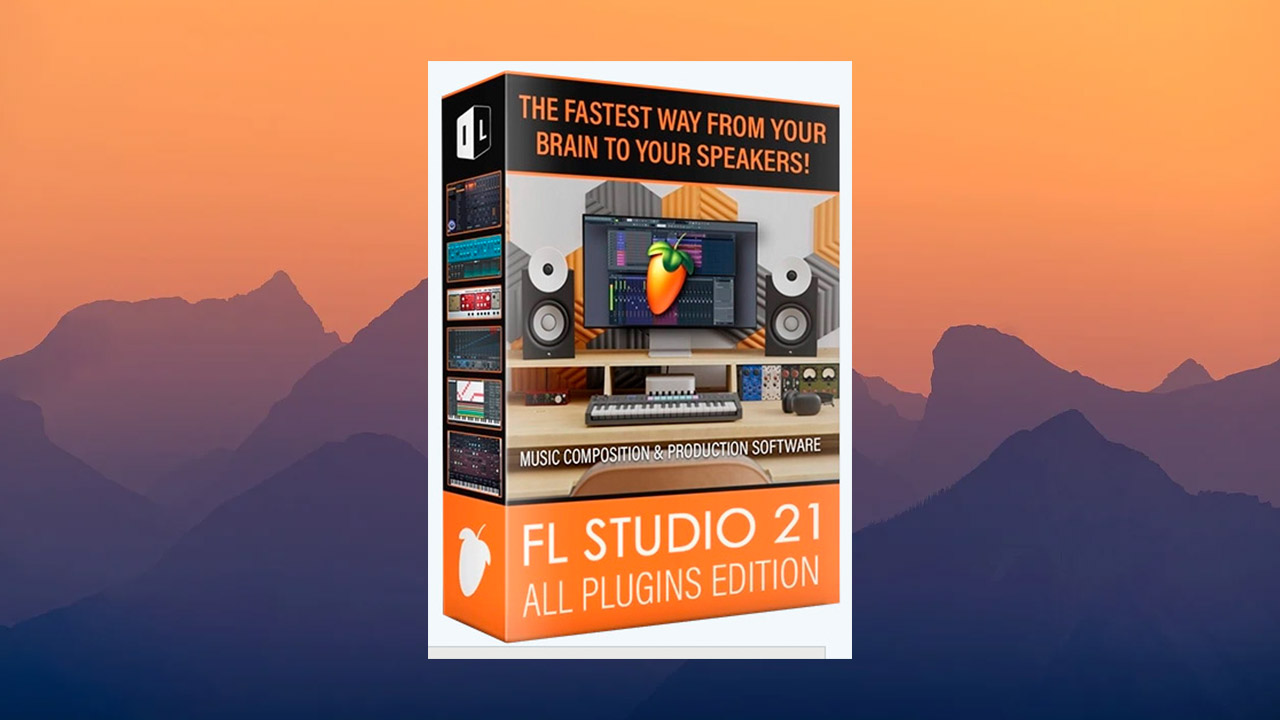
Image-Line has released an updated version of its DAW, FL Studio 21. The program now features the ability to use envelopes for each clip individually, new design themes, and other innovations.
FL Studio is one of the best programs for creating your own music. With it, you can create your own tracks in any style. The program has all the necessary functions for working with audio: recording, mixing, mastering, and also features a large number of synthesizers and effects.
✔️ What’s new in FL Studio 21:
The main innovation of the update is the ability to integrate envelopes into audio clips. This allows users to control levels, fades, and other parameters of each clip individually (via the playlist).
It is noted that overlapping two clips automatically creates a crossfade between them. Users can adjust the intensity and length of the crossfade.
The program now features new design themes with detailed customization options. FL Studio 21 features an updated file browser with tag support, improved search, and sample preview.
The DAW has been expanded with the Luxeverb reverb and Vintage Phaser. The latter offers a collection of several classic effects used by Jean-Michel Jarre on his Oxygene album.
Multiband Delay is included in Producer Editions and above. All versions of FL Studio 21 also feature a new VFX Sequencer, capable of transforming chords into melodic phrases.
Other changes include expanded language support (Spanish, German, and French), along with other improvements and bug fixes.
FL Studio & User Interface
Themes – Change the look and feel of your favorite DAW. Go to General Settings > Miscellaneous > Theme.
Project Folders – Go to Projects > General Settings, which opens the New Project dialog, which may appear when creating or saving a new project. This allows you to save all project data in a unique folder for each project, with subfolders for recorded, processed, and trimmed audio.
File settings – Added the ability to automatically save every minute (requested by Afrojack).
Language support – Spanish, French, and German, as well as English and Chinese.
Move undo recordings to the trash – enabled by default. Otherwise, they will be deleted upon undo.
Invert pencil buttons – changes the behavior of the secondary pen button to the primary button.
Alternate undo – now enabled by default when installing on a new computer.
Export – rendered files are automatically selected in the system file browser when opening the destination folder.
File (menu) – A new ‘More’ submenu has been added, showing up to the 50 most recent items.
File support – Apple’s .m4a audio format is now loaded.
Metronome – Separate options for the preview track and metronome mixer in the Sound settings.
New from template – The menu is updated when adding and removing templates.
Plug-in manager – Some incompatible plug-in search paths are no longer allowed.
Preferences window – The window has been redesigned to allow multilingual text, which may require more space. It also allows adjusting the height of the preferences window to fit on screens with low vertical resolutions.
Startup – If the project being launched crashes, the default project (when set to load the last project) will be used on the next launch to prevent crash loops. The splash screen is hidden when an audio device shows an error, so the message can be read.
Support – Crash logs now display the Windows version.
Text Input – Long and short space input is now performed with (Alt+Ctrl+Space) and (Alt+Shift+Space).
Touch Controller – Visualize note actions on the Touch Controller coming from the selected channel when note data is played from the Piano roll.
Enter Value – Additional information about the current value is displayed when selected.
Piano Typing – The keyboard octave for typing can now be changed with (Alt+Num Pad 2–6).
CPU – Improved CPU usage related to mixer processing improvements.
View > Tests – Run tests asynchronously.
Debug Log – Display updated browser folder names in the debug log.
Playlist
Audio Clip Fade and Gain Controls – Audio clips are faded in, faded out, and gain-controlled with optional automatic crossfades.
View – Hold (Alt) for a temporary preview of the fade and gain when the “Show fade previews / gain previews” checkbox is unchecked.
Menu – (Right-click) the ‘Show fade editing controls’ icon for quick access to the fade parameters.
Snap – Hold (Alt) to snap when fade marker snapping is disabled, so (Alt + click) no longer resets fades.
Shortcut – Added (Shift + F) to toggle the ‘Show fade editing controls’ icon.
Add Tracks – New [+] button in the Playlist Clip Focus area to add Instrument and Audio Tracks using left and right click.
Insert Location – Clips added to new audio tracks are placed at the playhead or within any time selection.
Drag and Drop – Hold Shift when dragging multiple samples to add them sequentially to the playlist. Dragging samples or cloning a track will select it.
Multiple Selection – Support for multiple selections when using the “Clip Menu > Chop” options.
Warning Dialog – A pop-up window with the track name appears when deleting multiple tracks from a playlist to remind you what is about to happen.
Playlist and Piano Roll – Deleting overlapping clips and notes selected with the “Select > Overlapping” option will delete only the top layers, leaving the bottom one.
Playlist and Piano Roll – Pasting clips and notes now occurs at the playback position (when possible).
Chop – You can now chop pattern and automation clips (in the “Clip Menu > ‘Chop’” menu).
Recorded Audio – An ‘Adjust position of recorded audio’ option has been added to the Mixer Input Delay menu.
Playlist – ‘Punch in / out recording’ markers have been renamed to ‘Start / Stop recording’.
Automation Clips
Editor – New button below the Automation Clip settings window for converting automation data to event data.
Warning Dialog – New ‘Don’t show this in the future’ option for warnings about approximate automation merging.
Merge – Can be merged with an approximate curve if an exact merge is not possible, including LFO mode.
Automation Clips Editor – Grid lines have been thickened for better visibility.
GUI – ‘Add target links’ (+) button pulses when actively adding links (click to start the process). Automation Clip Channel Envelope Grid Split changed to 4.
Channel Rack
Channel Button (Right Click) – New ‘Patcherize’ option to convert the current instance to Patcherized format.
Channel Rack – Now scrolls when moving a channel outside the visible vertical range.
Channel – Shows a tooltip when the plugin replaces the channel sampler.
New plugins and instruments:
LuxeVerb (All Plugins Edition) – An advanced algorithmic reverb with a luxurious and flexible sound, capable of simulating realistic and experimental acoustic spaces of any size.
Vintage Phaser (Signature Bundle and above) – Inspired by and modeled after the Electro-Harmonix Small Stone Phase Shifter™ from the 1970s.
Multiband Delay (Producer Edition and above) – Splits the incoming audio into 16 frequency ranges and allows you to delay each band individually. A great tool for sound design!
VFX Sequencer (Fruity Edition and above) – A pattern arpeggiator and step sequencer designed for use in Patcher to send note sequences to connected instrument plugins.
Browser (Enhanced)
Tags – Click TAGS (bottom) to open additional options.
Favorite – Click the star when hovering over content.
Search – Boolean search queries. Folder icon in the search field to limit found items to the current folder only. ‘Type to filter’ menu option to decide whether the input filters letters or selects items. Selects the first folder when searching in multi-column views. Folders with a matching name are displayed in the search results. Show full path as a tooltip for filtered items.
Find a file – Right-click a file to select it in the system file browser.
Tags – (Right-click) to remove tags.
Tabs – (Right-click) tabs to enable the ability to individually remember tab sizes.
Multi-selection – Multiple selection of items, including: (Shift+click) and (Alt/Command+Ctrl+click).
Content formats – .fxp, .fxb, and .vstpreset files are now marked as ‘presets’. .mid MIDI files are marked as ‘score’.
Tabs – New tab options (right-click) for moving browser tabs left/right. ‘Clone this tab’ option.
Library tab – Added online content for free and paid download. Content will automatically be available to plugins that can use it. Audio demos – Content library items can now have embedded audio demos.
Audio preview – Playback at the mouse cursor position can now be started with (right-click) OR (Shift+click) and hovering over the mouse cursor for precise positioning. Browser menu option ‘Full sample preview’. The sample preview panel displays Sample Rate, Bit Depth, and Stereo metadata.
New option – ‘Show icons and text on tabs’ to display icons and text on tabs.
Browser – Added ‘Frozen’ option for tabs. When ‘Frozen’, the browser stops saving state (which folders are collapsed or not). The ‘Collapse structure’ button acts as ‘restore to frozen state’.
Piano Roll
Preview – Automatically scrolls the piano roll when transposing notes.
Mouse Wheel Precision – Improved precision when editing note voice properties with the mouse wheel.
Piano roll – The selected channel opens when double-clicking an empty sample clip.
Updated Plugins
Vintage Chorus – Added support for context-sensitive value input.
Maximus – Grid lines and “Compression Envelope” labels are now more visible.
FLEX – Preset changes can be undo with (Ctrl+Z). The default value for the Master Output volume fader is now 100%.
Wrapper Plugin – Ability to control whether FL Studio can process keystrokes (Ctrl+Z) for undo.
FL Studio Mobile – Updated to version 4.1.4.
3x Osc, DX 10 & Fruit Kick – Can now be used in Patcher.
Edison – Added multiple selection of Envelopes.
Convolver – Impulse samples no longer have a length limit.
Audio Editors (Scripts) – Convolver, Edison & Slicex; Python replaces PaxCompiler. Existing scripts have been converted to Python. Scripts now work not only on Windows, but also on macOS.
Editors (Synchro Playback) – Move the playhead anywhere in the playlist, piano roll, and event editor.
Formula Controller (and other formula locations) – Added new operators and functions to formulas:
New operators: fmod – 2 operands (floating point and modulo), 2 operands (shl and shr), bitwise operators (shift left and shift right).
New functions: Fold(x) – Wave fold operation (x = input threshold and gain is always 1.0). Warp(x, y) (Warps signal “x” around warp point “y”). Map(x, y, z) (Maps x value to range [y, z]. Equivalent to x * (z – y) + y).
Gross Beat – New “Juggling Science” preset.
Sound Font Player – Added ‘Program mode’ parameter determining how patches are triggered.
Visualizer – Added new post-processing effects from Dubswitcher.
Visualizer (ZGE):
User Interface – Supports separators between parameters in effects. Added a toolbar button as a shortcut for showing transparency. You can now choose which buffer to show in the preview window.
Zip – Added custom effects to zipped projects.
Touch Controllers – Supports a touch controller window in the ‘Add window’ list.
New effects – Audio Generator (Windows only), Dubswitcher Field Generator, Dubswitcher Dropshadow, Dubswitcher Fast HSV, Dubswitcher Fast Static, Dubswitcher Soft Glitch, Dubswitcher AlphaKey, Dubswitcher Color Shaper, Dubswitcher Inverter, Dubswitcher Jitter Glitch, Dubswitcher Linear Blur, Dubswitcher Smudge, Dubswitcher Solidify, Dubswitcher Starburst, Dubswitcher Whitehole.
Presets – HUD Text can now find fonts outside of the fonts folder.
“Surface” tab – added “Surface” tab to simplify preset configuration.
Images – Added export to the APNG image format. The .jpeg extension is now used by default when saving bitmaps.
Effect Update – Added a blend parameter to the “TextDraw” effect.
MIDI Scripts and MIDI
Performance Mode – getPerformanceModeState function. Checks if the FL Studio playlist is in “performance mode”.
MIDI Controller ID – Identification of MIDI devices is now deferred until scripts are loaded for the first time.
External Links – Allow redirecting help links in scripts (should be links to the IL forums).
Mixer
Select All Tracks (Ctrl+A) – This applies to actions enabling/disabling track effects and level changes.
Bypass Effects – Now works for all selected mixer tracks.
New Render Option (Mixer menu) – ‘Render selected tracks to wave files’ (allows you to render selected tracks to wave files).
Mixer – The window no longer opens automatically when creating a new audio or instrument track.
Windows
Installation – Users can no longer save files to the FL Studio installation location. The FL Studio installer will no longer associate the program with .flp files in beta versions to prevent accidental saving in beta.
What’s new in FL Studio 21.1:
FL Studio:
Colored waveforms – General settings option to color code frequency content in audio waveforms. This applies to the Browser, Playlist, Sampler Channel, etc.
MIDI Control – New ‘External sync’ mode & improved clock stability. This allows FL Studio to sync to an external MIDI clock so that it plays in time to an external MIDI clock source.
Automated updates – Option to automatically download FL Studio updates and apply them at the next restart.
Piano roll
Snap to Scale – Piano roll option to snap notes to the selected scale on placement or movement. See the note icon on the toolbar.
Menu > Tools > Script – Scripts are Python-based, allowing custom manipulation of Piano roll data. There are several pre-made scripts or you can write your own. Scripting also includes automatic user interface creation. See the Piano roll scripting forum to share and discuss Scripts.
New & Updated Plugins
Hyper Chorus – Extreme chorus FX plugin, included with Producer Edition and up.
Edison Declipper – New and improved AI-based declipping tool. Can restore recordings that have been clipped due to level issues.
SliceX – Now resizable by dragging the lower-right corner.
✔️ Features of Portable:
Portable version works without installation on PC
Does not require registration
Interface language: English, German, and others (Russian is not available).
Leaves no traces in the system or registry.
The “Documents\Image-Line\Downloads” folder is located in: “FL Studio\App\Documents\Image-Line” and will be created after the program is launched.
The “Documents\Image-Line\Downloads” folder is located in: “FL Studio\App\Documents\Image-Line” and will be created after the program is launched.
