
![FabFilter Total Bundle v2025.05.15 [Intel/Apple] [HCiSO] [AU, VST2, VST3, CLAP] [MAC]](https://looptorrentz.net/wp-content/uploads/2026/04/FabFilter-Total-Bundle-v2025.05.15-IntelApple-HCiSO-AU-VST2-VST3-CLAP-MAC.jpg "FabFilter Total Bundle v2025.05.15 [Intel/Apple] [HCiSO] [AU, VST2, VST3, CLAP] [MAC]")
Year | Release date : 05.2025
Version : 2025.05.15
Developer : FabFilter
Platform : Intel/Apple Silicon Universal [M1-M2]
Tablet : HCiSO
System requirements :
☑ Operating system: macOS 10.13 or later (64-bit only)
☑ Processor: Intel or Apple Silicon (M1/M2/M3/M4+)
☑ Supported plugin formats: AU, VST2, VST3, CLAP
☑ Plugin-compatible host (DAW)
Size : 320.5 MB
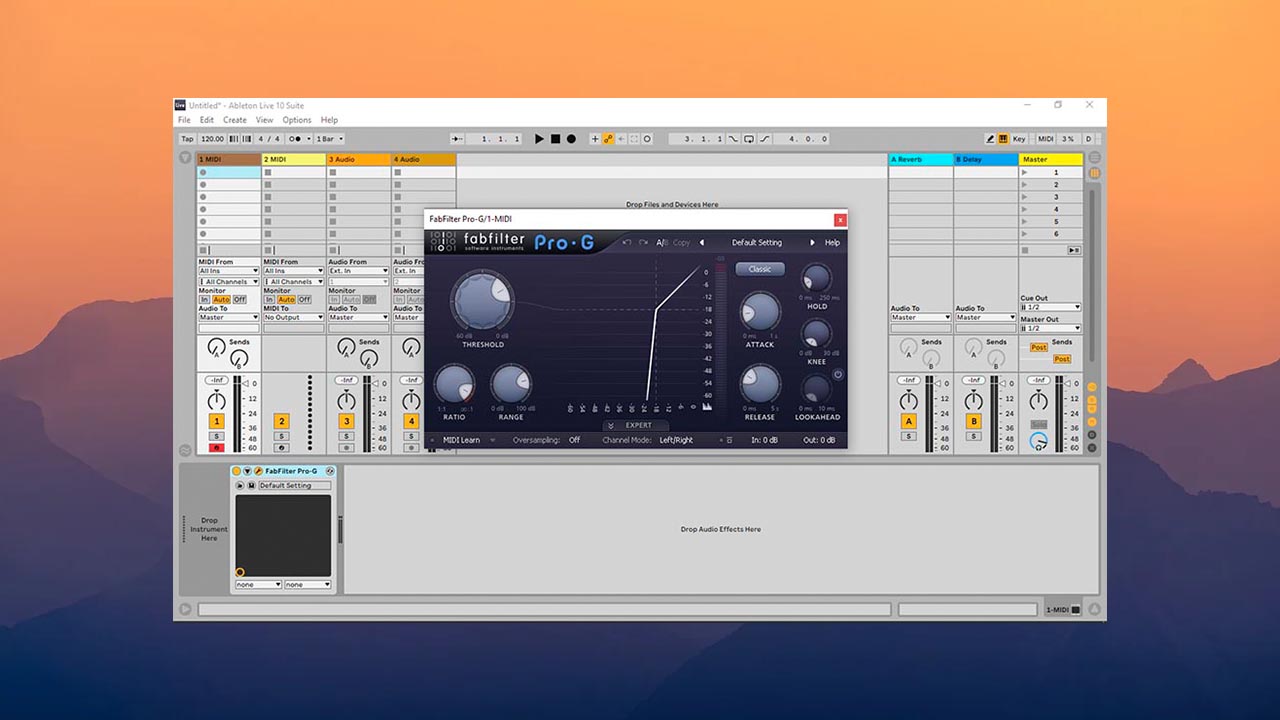

FabFilter Total Bundle is a complete set of all FabFilter plugins, providing a versatile set of tools for professional processing, mixing, and creative sound design. This package includes the latest versions of modern flagship plugins, as well as eight classic (legacy) modules from previous generations.
With the Total Bundle you get:
• Professional EQ with a graphical interface and dynamics processing (Pro-Q)
• Natural and spacious reverb sound with precise adjustment (Pro-R)
• Compressor with precise visual control and analog-style algorithms (Pro-C)
• Multi-band dynamics with advanced routing and spectral analysis (Pro-MB)
• Maximum transparency and loudness limiter with clipping prevention algorithms (Pro-L)
• Universal de-esser with intelligent high-frequency processing (Pro-DS)
• Gate/expander with visual feedback and advanced trigger settings (Pro-G)
Also included:
• Saturn — creative multi-band saturation and distortion with analog models
• Timeless — powerful and musical delay with modulation and filters
• Volcano — complex modular filter with flexible routing and LFO shapes
• Twin and One — analog synthesizers with This bundle is ideal
for both advanced sound engineers and producers, as well as beginners who want everything they need for modern production. FabFilter is renowned for its sound quality, well-designed interface, and minimal CPU load, making these plugins an industry standard.
Features of the assembly
• Complete set: all 14 current FabFilter plugins + 8 classic (Legacy)
• Includes 7 flagship plugins of the Pro series: compressor, multiband compressor, limiter, equalizer, gate, de-esser and reverb
• 4 creative effects and sound generators: delay, distortion, filter and synthesizer
• 3 simple but powerful filters for basic processing
• Support for all popular plugin formats: VST2, VST3, Audio Units and CLAP
• Works on both Intel and Apple Silicon (M1 / M2 / M3 / M4)
✔️ Installation is elementary – just run and use. No cracks, patches or unnecessary movements.
The assembly from the proven HCiSO team is stable, working and tested.
✔️ Included Plugins
• FabFilter Micro 1.30
• FabFilter One 3.50
• FabFilter Pro-C 2.20
• FabFilter Pro-DS 1.24
• FabFilter Pro-G 1.34
• FabFilter Pro-L 1.35
• FabFilter Pro-L 2.24
• FabFilter Pro-MB 1.31
• FabFilter Pro-Q 2.28
• FabFilter Pro-Q 3.27
• FabFilter Pro-Q 4.02
• FabFilter Pro-R 1.18
• FabFilter Pro-R 2.04
• FabFilter Saturn 1.29
• FabFilter Saturn 2.11
• FabFilter Simplon 1.40
• FabFilter Timeless 2.39
• FabFilter Timeless 3.08
• FabFilter Twin 2.39
• FabFilter Twin 3.05
• FabFilter Volcano 2.39
• FabFilter Volcano 3.07
✔️ Frequently Asked Questions
Question: Is this an update or a full installer?
Answer: This is a full installer from scratch. Does not require previous versions.
Question: Do I need to remove old versions, other builds, etc.? How deep should I clean my system?
Answer: No, you don’t need to delete anything. The installer will automatically detect and update any existing FabFilter plugins, if any.
Question: Can I install over older versions?
Answer: Yes, installation over older versions is supported. All plugins will be updated to the latest versions.
Question: Is the HCiSO build compatible with installed MORiA plugins?
Answer: According to the HCiSO team, yes, it is compatible. They write that their installer doesn’t touch AAX plugins, and if you have MORiA versions installed, AAX will continue to work. However, I haven’t personally tested this.
Question: None of my presets open. What should I do?
Answer: After updating, this happens to those who have enabled synchronization of the Documents folder in iCloudDrive – the path to the preset folder is moved to it. Download factory presets from the official website (https://www.fabfilter.com/support/downloads) and unzip them to Documents/FabFilter/Presets (/Users/

![GForce & Novation Bass Station 1.0.1 SAL, VSTi, VSTi3, AAX (x64) [04.2025] (MOCHA)](https://looptorrentz.net/wp-content/uploads/2026/03/GForce-Novation-Bass-Station-1.0.1-SAL-VSTi-VSTi3-AAX-x64-04.2025-MOCHA-445x265.jpg "GForce & Novation Bass Station 1.0.1 SAL, VSTi, VSTi3, AAX (x64) [04.2025] (MOCHA)")
![Safari Pedals Standard Audio Level-Or v1.4.2025 VST3, AAX x64 [04/05/2025] (BUBBiX)](https://looptorrentz.net/wp-content/uploads/2026/03/Safari-Pedals-Standard-Audio-Level-Or-v1.4.2025-VST3-AAX-x64-04052025-BUBBiX-445x265.jpg "Safari Pedals Standard Audio Level-Or v1.4.2025 VST3, AAX x64 [04/05/2025] (BUBBiX)")