
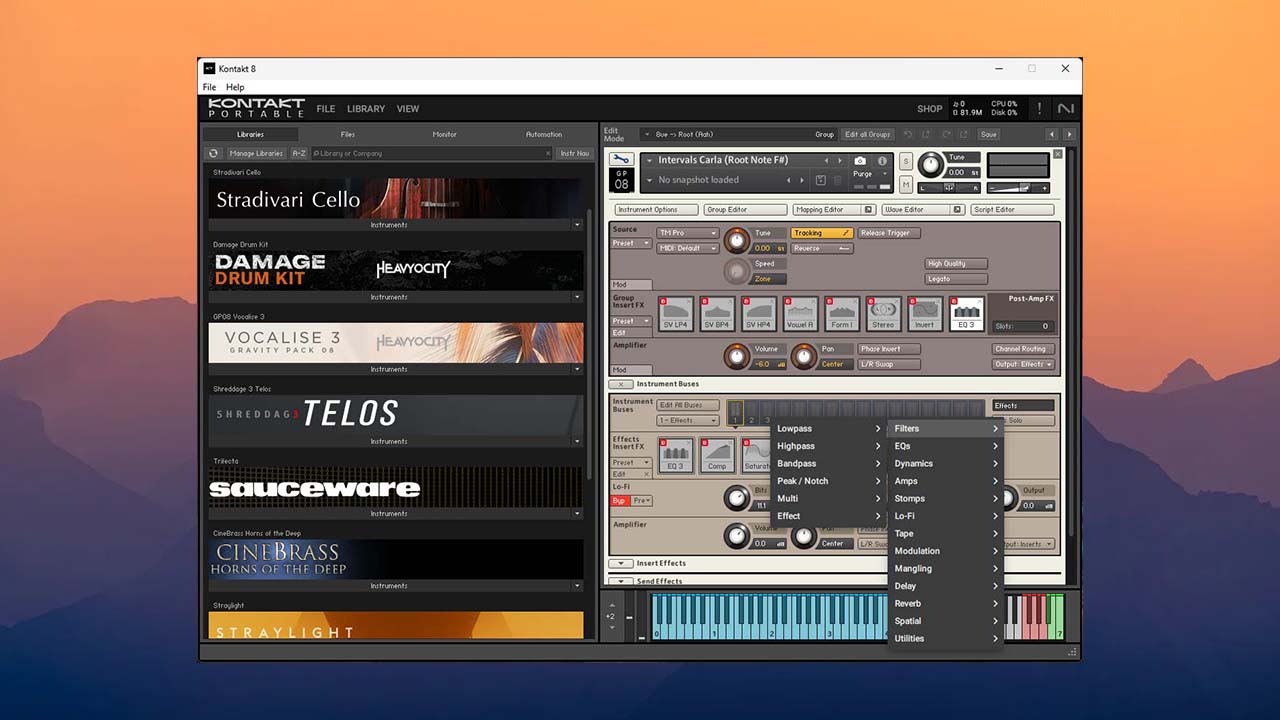
Year | Release date : 05.2025
Version : 8.4.0
Developer : Native Instruments
Format : STANDALONE, VSTi, VSTi 3, AAX
Bit depth : 64-bit
Interface language : English
Tablet : not required (installer already treated)
System requirements :
☑ Windows 10 or 11 (latest Service Pack)
☑ Intel Core i5 or equivalent CPU
☑ 4 GB RAM (6 GB recommended)
☑ Graphics hardware support for Direct 3D 11.1 (Feature Level 11_0) or higher
☑ Works both in Standalone and as VST 2/3 in DAWs, AAX* (Pro Tools)
Size : 1.26 GB


Kontakt lets you play back and process previously recorded audio data—samples of musical instruments, sound effects, vocal tracks, and more—but that’s only a small part of its full range of capabilities. In Kontakt, you can use ready-made instruments from a huge number of third-party libraries or create your own virtual instruments, apply powerful built-in processing modules to their audio signals, and construct complex performance schemes with diverse modulation relationships. Everything is possible—from ultra-precise recreations of real instruments to creating original, unique instruments.
The main innovation of Kontakt version 6 is the wavetable engine, which enables new hybrid instruments combining synthesis and sampling to create unique sonic textures.
What’s new in Kontakt 8:
Version 8 introduces new features, instruments, and samples. New in version 8 are the Chords and Phrases features, which allow users to generate melodies and sequences using both MIDI content and randomization tools. Both features are compatible with both Kontakt itself and any instrument built on the Kontakt engine.
Another significant addition is Leap, which allows for quick work with loops and samples and will be familiar to anyone who has used Arcade by Output. Leap comes with 12 genre-specific extensions, including Afrobeats, Latin Trap, and Soul Gold. Conflux is a new instrument that combines a sampler engine with waveform and FM synthesis, allowing for real-time manipulation and modulation.
Speaking of aesthetics, a completely new browser has been added, allowing you to browse all instruments installed on your computer that are compatible with Kontakt. You can search by sound type and character, or by instrument brand.
Piano Uno: Kontakt 8 comes with an easy-to-use piano library
Changelog:
8.4.0 (2025-05-20)
Minimum OS requirements: macOS 13, 14, and 15 (latest update), Windows 10 or 11 (latest Service Pack).
OVERALL CHANGES
ADDED Further analytics for Default vs Classic View usage from opt-in users
FIXED Crash when removing Instrument and switching Pages
FIXED Crash when clicking Activate Demo
FIXED Instrument Sidepane Navigator Volume/Pan unresponsive to automation
FIXED Instrument Sidepane Navigator buttons were stealing Spacebar focus from DAW
FIXED Clicking File/New Leap inadvertently created two Leap instruments
FIXED Minimizing the Instrument Header of small-height instruments made them invisible in Classic View
FIXED Snapshot not highlighted when loading default preset
FIXED Default View rack not displaying instruments when switching from empty page of Classic View
FIXED Clicking Snapshot Previous/Next jumps to first Snapshot after reopening instrument GUI in DAW
FIXED Artwork for Tools, Leap, and some Combined content not displayed in navigator and on hardware
BUILDER CHANGES
ADDED 1960’s tweed era amplifier FX DSP – Reverb Delight from Guitar Rig 7
ADDED KSP: Ability to get the info set via redirect_output() in previous script slots with new event parameters $EVENT_PAR_OUTPUT_TYPE and $EVENT_PAR_OUTPUT_INDEX and returning a new constant $OUTPUT_TYPE_NOT_SPECIFIED if output was not set/detected
ADDED KUI: New ‘Text’ property to fetch $CONTROL_PAR_TEXT for KSPButton, KSPKnob, KSPSwitch and KSPValueEdit
ADDED KUI: Ability to disable automatic closing of Popovers
ADDED KUI: Customizable TextInput component
ADDED KUI: Main thread scripting with Komplete Script (can run even when GUI is not open)
ADDED KUI: Reduced wait times by not re-triggering KUI reloading if reloading is triggered during a reload
FIXED KUI: Changing the visibility of a ui_menu entry in KSP wasn’t reflected in KUI
FIXED KUI: Divide-by-zero corrupts layout without error
FIXED KUI: Modifier inside declarative for/if can cause a cycle detection error
FIXED KUI: Hierarchical order of reactive updates not always respected
FIXED KUI: Feature toggle for experimental features broken
✔️ Installation:
Create an empty folder. The name of the folder itself and the path to it MUST NOT CONTAIN CYRILLIC. The folder MUST BE WRITTABLE. Do not place the folder on the system drive.
Run the installer (KontaktPortable_v8**.exe) > “Browse…”, select the created folder > “Extract”.
The first time you launch the Library Manager, it will automatically scan the factory content, as well as already installed libraries (scanning the registry).
After the scan is complete, save the changes and (re)launch Kontakt.
If the changes were not saved at the first launch, you can start the automatic scan at any time by pressing Alt + Insert or from the Manager’s context menu:
ADD > quick search for installed libraries.
By default, libraries are added only to the classic browser (except for the factory content). This behavior can be changed in the Library Manager settings:
Libraries > Manage libraries in the NKS browser
. How to add Kontakt 8 PORTABLE VST3 to a DAW.
Method 1 (not suitable for all DAWs):
Add the Kontakt8Portable\Kontakt 8\x64\VST3\ folder as an additional plugin scanning folder. For details, please refer to your DAW’s manual.
Method 2.
Run Kontakt8Portable\Install.exe.
On the component selection page, check the box “Add VST3 plug-in to DAW”.
How to update Kontakt 8.xx to the next version:
1. Run the installer KontaktPortable_v8**.exe.
2. Click “Browse…” and select the folder containing the Kontakt 8.xx PORTABLE files > “Extract”.
3. When the “Confirm file replace” window appears, confirm the file replacement (Click “Yes to All”).
Portable Features:
Portable Author: vkDanilov
Treatment performed

![iZotope RX 11 Audio Editor Advanced 11.2.0 4231 STANDALONE, VST3, AAX x64 [2024] Portable by FCPortables](https://looptorrentz.net/wp-content/uploads/2026/03/iZotope-RX-11-Audio-Editor-Advanced-11.2.0-4231-STANDALONE-VST3-AAX-x64-2024-Portable-by-FCPortables-445x265.jpg "iZotope RX 11 Audio Editor Advanced 11.2.0 4231 STANDALONE, VST3, AAX x64 [2024] Portable by FCPortables")
![Aqusmatiq Maxhead v1.1.0 Patched Inc. VST3, AAX x64 Keygen-MOCHA [2025]](https://looptorrentz.net/wp-content/uploads/2025/06/Aqusmatiq-Maxhead-v1.1.0-Patched-Inc.-VST3-AAX-x64-Keygen-MOCHA-2025.jpg "Aqusmatiq Maxhead v1.1.0 Patched Inc. VST3, AAX x64 Keygen-MOCHA [2025]")