
Year | Release date : April 28, 2024
Version : 2.0.0
Developer’s website : Togu Audio Line
Format : VSTi, VSTi 3, AAX, CLAP
Bit depth : 64 bit
Tablet : included [keygen]
System requirements :
☑ Windows: 7 or higher (x64)
☑ DAW: FL Studio / Cockos Reaper / Ableton Live Suite, etc.,
☑ supporting VST 2/3, CLAP, AAX (Pro Tools)
Size : 45.1 MB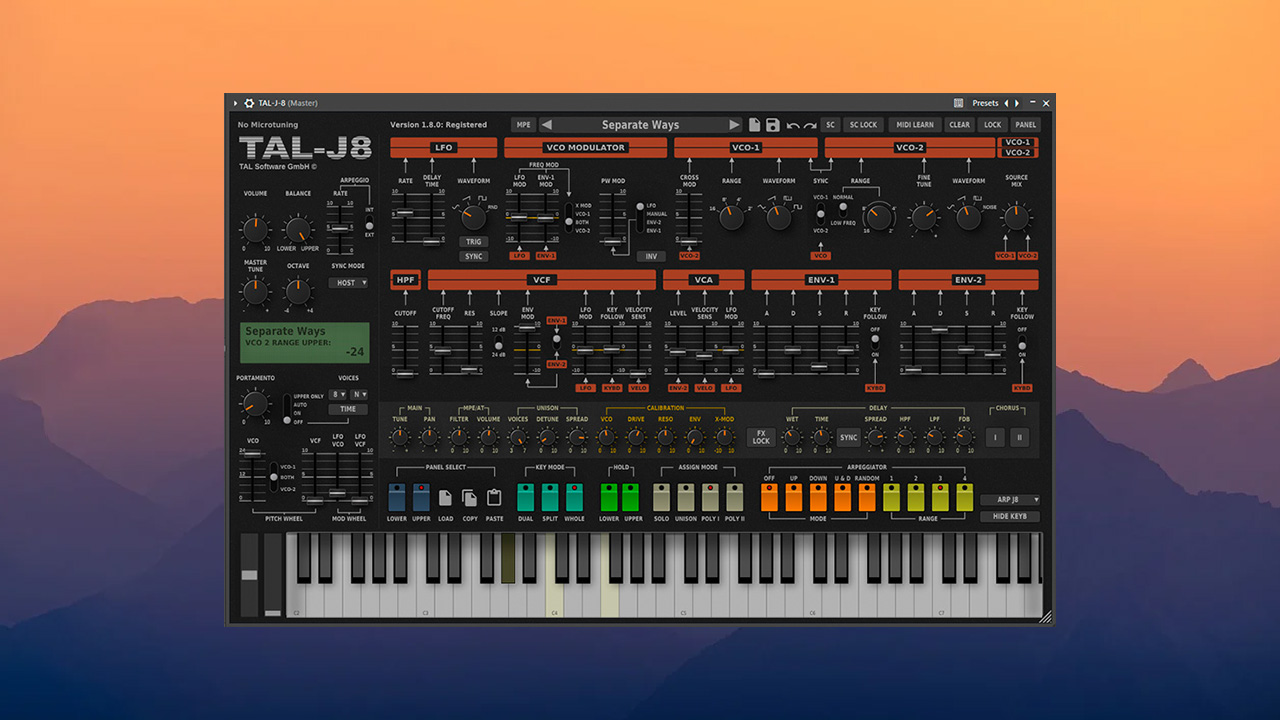
The TAL-J-8 from TAL Software, a popular developer of vintage synthesizer emulations, emulates the sound of the classic Roland Jupiter-8. The virtual synthesizer focuses on recreating the sound of the original instrument, rather than adding additional features, the developer notes.

As with other developments, Patrick Kunz of TAL Software has faithfully reproduced the original instrument’s performance. Kunz notes that, aside from MPE support, the new TAL-J-8 lacks extensive additional features compared to the Arturia Jup-8 and Roland Zenology Pro. The primary focus during development was on accurately recreating the distinctive sound of the original synthesizer.
In addition to emulating the oscillators and other sections of the Roland Jupiter-8, the new instrument features a Unison mode for oscillators and a sound calibration section. The latter allows you to adjust the pitch, resonance, and amount of distortion in the generated audio signal.
Despite the release of the new product, TAL Software has not yet published videos demonstrating its capabilities. No audio files or additional presets were found on the developers’ website. A quick demo of the instrument, however, suggests that synthwave fans’ must-have list now includes one more plugin.
✔️ Features:
Authentic emulation of a 80s hardware synthesizer.
Use the calibration section for extreme resonance and filter overdrive.
VCO-based UNISON with stereo widening and a full stereo signal path.
MPE support.
Microtuning support (configuration file import and MTS client).
Over 300 factory presets from Solidtrax, Emptyvessel, Electric Himalaya, and others.
✔️ What’s new:
Version 2.0.0 / 18.04.2025
More user interface contrast.
Framework updated.
Windows UI performance increased.
✔️ Treatment procedure:
1. Place the folder/file in the appropriate directories:
*.dll
Code:
C:\Program Files\Vstplugins
or
Code:
C:\Program Files\Steinberg\vstplugins
*.vst3
Code:
C:\Program Files\Common Files\VST3
*.aaxplugin
Code:
C:\Program Files\Common Files\Avid\Audio\Plug-Ins
*.clap
Code:
C:\Program Files\Common Files\CLAP
NOTE:
If you previously installed this plugin using *.exe, check that the files from the previous installation are not duplicated in the specified directories.
2. Run TAL_RSA1024_KeyGen.exe, select the product (TAL-J-8), click “Generate” and paste the obtained data (in full!) into the plugin.
All operations must be performed as administrator
Do not use Cyrillic.
Author of the medicine: TEAM R2R

![reFX Afro House [Nexus Expansion]](https://looptorrentz.net/wp-content/uploads/2026/03/reFX-Afro-House-Nexus-Expansion-445x265.jpg "reFX Afro House [Nexus Expansion]")
![Zynaptiq BALANCE v1.0.2 [X] VST3 [WIN]](https://looptorrentz.net/wp-content/uploads/2026/03/Zynaptiq-BALANCE-v1.0.2-X-VST3-WIN-445x265.jpg "Zynaptiq BALANCE v1.0.2 [X] VST3 [WIN]")